

Creating a personalized pre-listing packet with Claude is fast and easy, and it impresses prospective sellers. Give Claude a CMA and a prompt that defines the email structure, answer three questions about the appointment, and Claude writes the packet email for you to send before the listing appointment. The seller sees preparation before you walk in the door.
What Does Signal Theory Say About Listing Presentations?
Signal Theory is the idea that you can show a prospective seller what working with you is like by giving them a very strong first impression. A seller cannot inspect your service before hiring you, so each early touchpoint signals the level of professionalism and thoroughness to expect.
What you send before the appointment is the part of your work the seller can see. A generic template signals a generic agent. A packet built around the seller's own home signals preparation and follow-through.
How Does a Personalized Pre-Listing Packet Do the Selling Before You Walk In?
A personalized pre-listing packet gives the seller a strong first impression, and that impression does part of the selling before you arrive for the listing appointment. By the time you ring the doorbell, the seller has already seen your market knowledge and your marketing approach.
Sellers care about marketing. According to NAR's release on its 2025 Profile of Home Buyers and Sellers, getting help to market the home to potential buyers is among sellers' top priorities when choosing an agent. A pre-listing packet with a marketing section answers that priority before the appointment starts.
I open the marketing section with the strengths of the home, because I like to say something good about a seller's home before I see it. Written by hand, a packet this specific takes hours, and that cost is why generic templates are common. Claude removes the cost.
How Do You Make a Pre-Listing Packet With Claude, and What Does It Look Like?
You make the pre-listing packet by giving Claude a prompt, a CMA, and three answers about the appointment: the date, the time, and the seller's first name. Claude writes the full packet email, and you copy it into a Google Doc, add sample marketing, and send it.
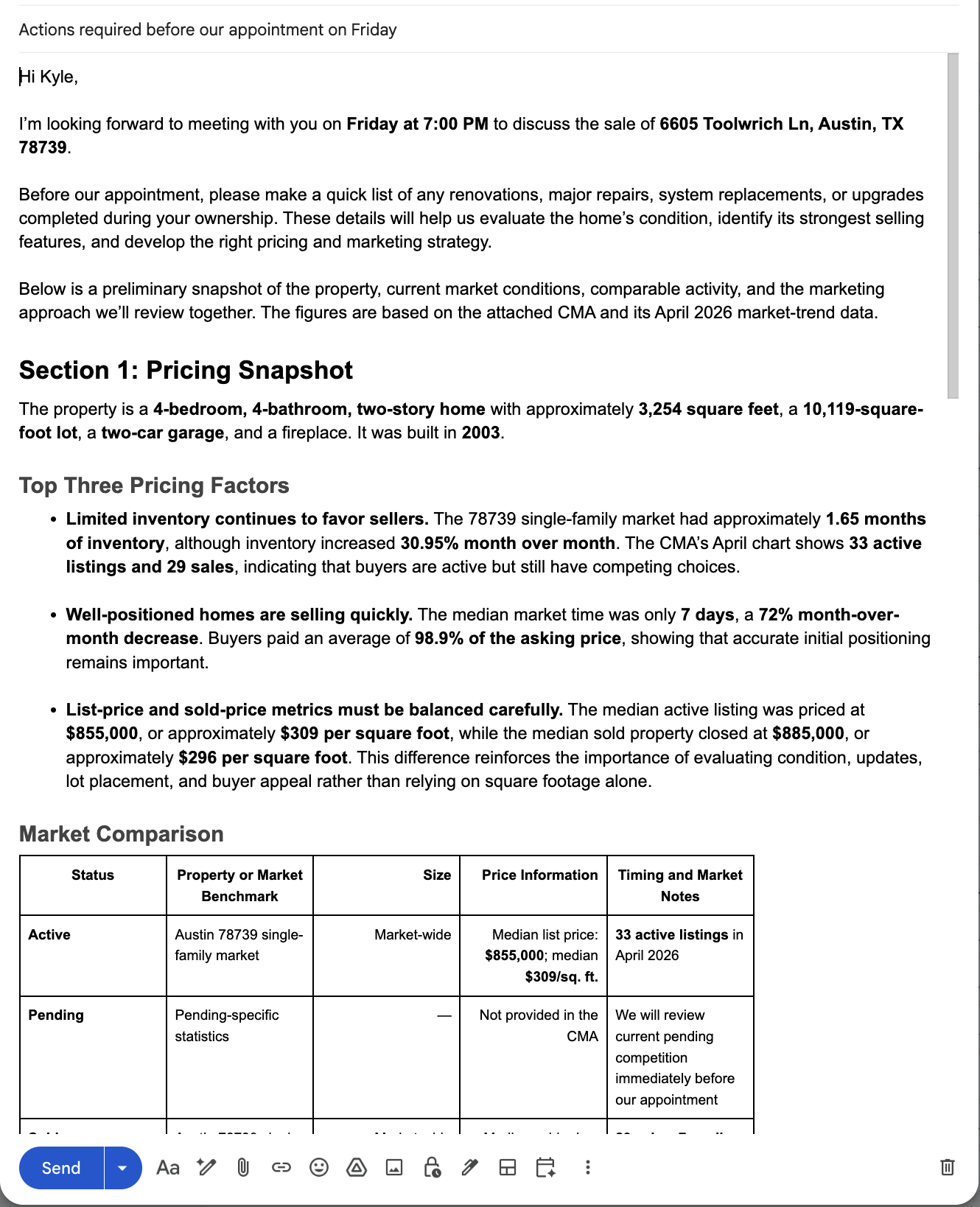
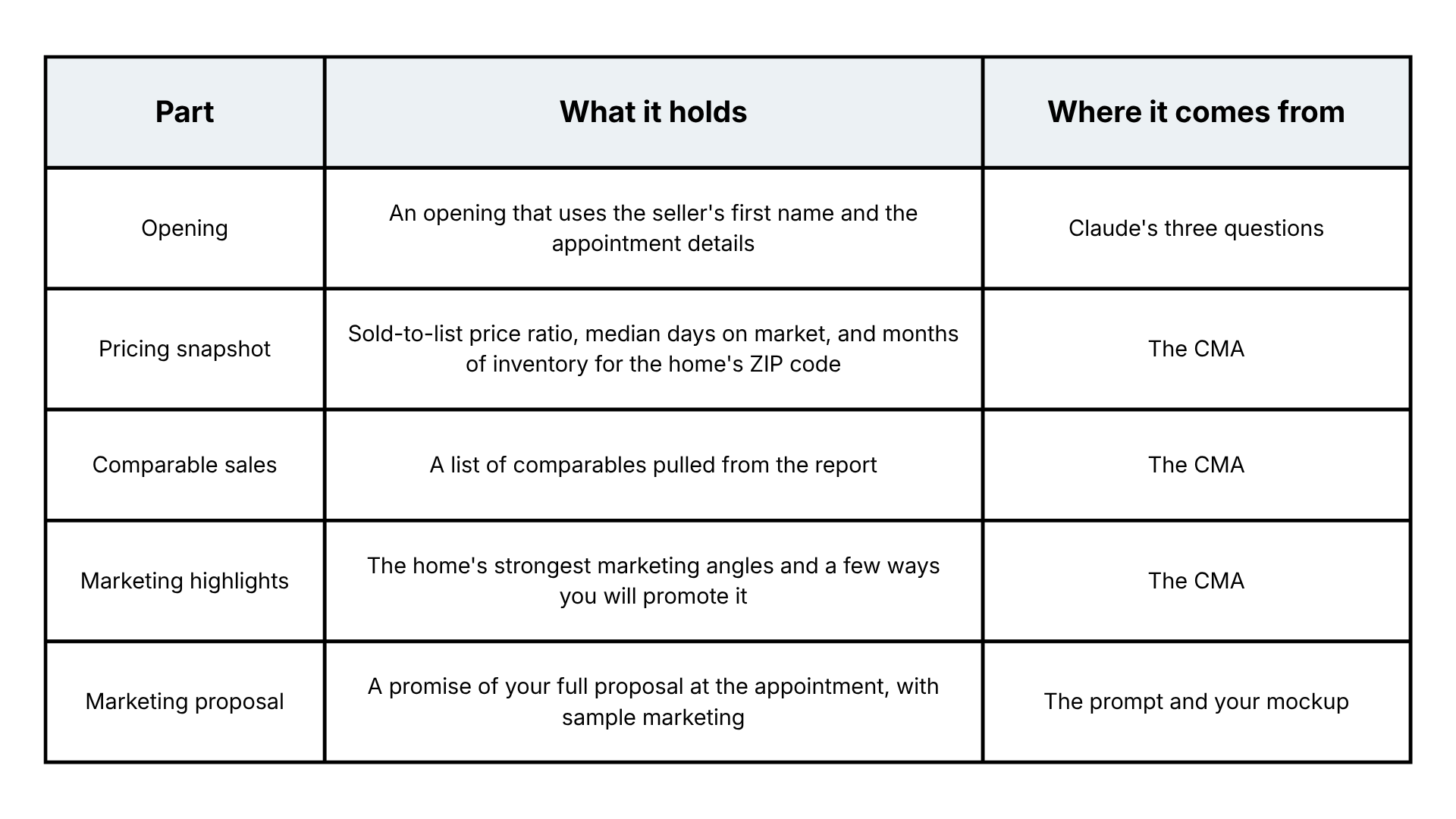
A finished pre-listing packet has five parts:
The pricing snapshot ends with a line that holds the number back: "Until I walk the property on Friday, I won't put a number to your home. Condition updates and presentation all factor into the right pricing strategy." The seller gets real market data and a clear next step.
What Are the Three Keys to a Pre-Listing Packet That Stands Out?
Three keys make the packet work: specify the output in your prompt, use a CMA so Claude can extract data the seller cannot easily find, and show sample marketing customized with a photo of the seller's home.
Key 1: Specify the Output in Your Prompt
Define the structure of the pre-listing packet email inside your prompt. Letting AI take one unstructured first attempt, known as "one-shot", returns a different email on every run. I want my pre-listing packet to be the same every time, so I tell Claude exactly what the email contains and in what order: an opening, a pricing snapshot, a marketing discussion, and a marketing proposal.
The prompt has four parts: a role, input requests, the required email structure, and data extraction requirements. The role line reads:
"You are a useful assistant creating a comprehensive listing packet email for a real estate agent to send to their prospective seller."
The input requests tell Claude to ask for the seller's first name, the appointment date, the appointment time, and the CMA.
Key 2: Use a CMA to Make Data Extraction Easy
A CMA or similar report gives Claude information the seller cannot easily get on their own, and it spares you from typing property details into every packet. Tell Claude in the prompt to pull the property and market data out of the report.
In one of my pre-listing packets, the pricing snapshot showed a 98.9% sold-to-list price ratio, a median of 7 days on market, and 1.65 months of inventory for the seller's ZIP code. Those figures came from one CMA that Claude read, so you can trace every number to a source you hold.
Key 3: Show Sample Marketing With the Seller's Home on It
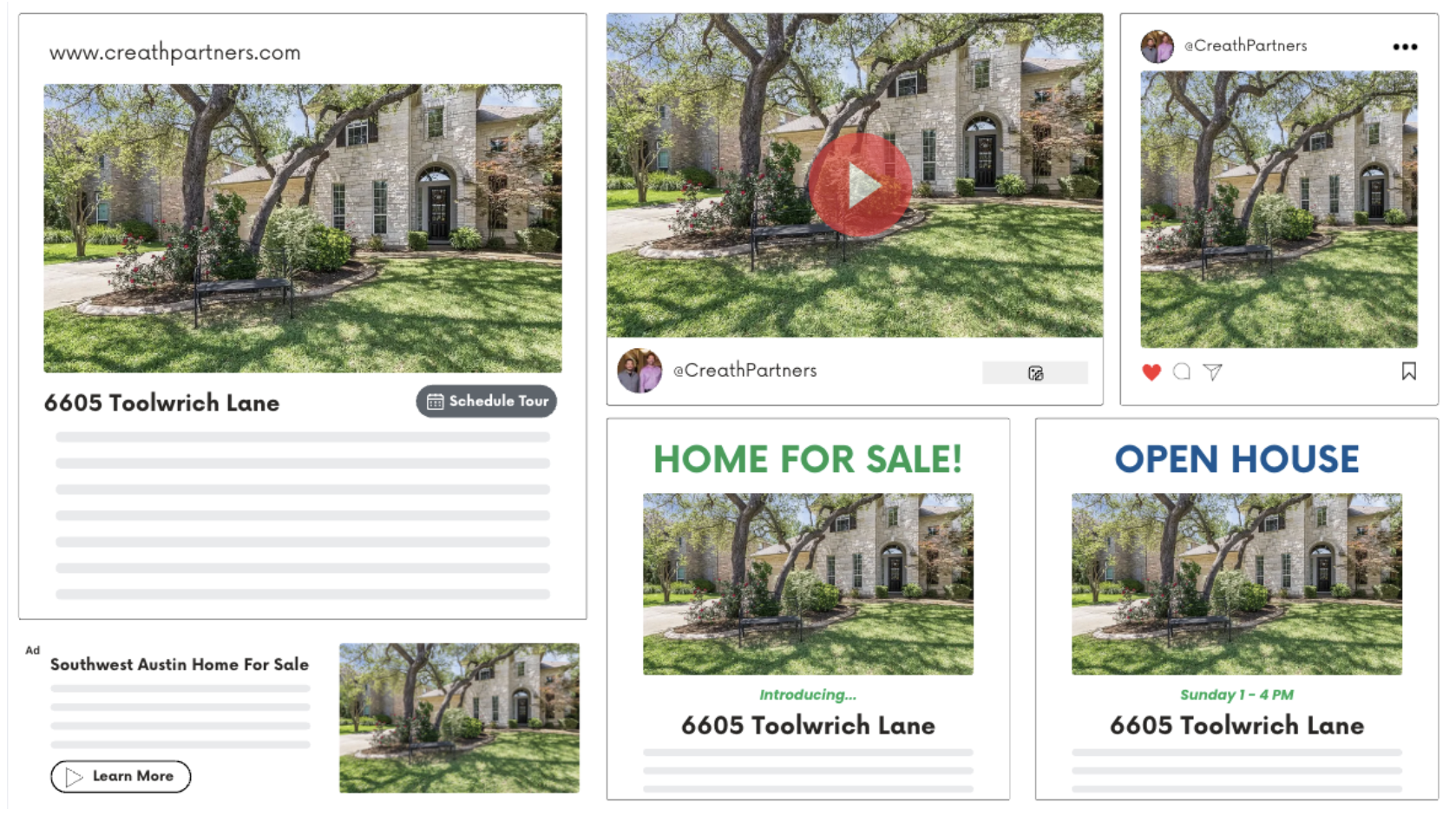
A sample of your marketing, customized with a photo of the seller's home, gives the pre-listing packet email a visual that stands out. The seller sees their own home on a website, in a video, and in an Instagram post before you arrive.
I build the sample in a Canva template that mimics listing marketing: a simulated website, a simulated YouTube video, and a simulated Instagram post. Build yours in three steps:
- Find a photo of the home from its last sale online.
- Place the photo in the template with the address.
- Take a screenshot of the finished mockup.
The sample is a mockup that lives only inside the packet.
5 Steps to Make a Pre-Listing Packet With Claude AI
Load a pre-listing prompt and a CMA into Claude, and the packet email arrives in seconds. Writing the same email by hand means pulling the comparable sales, summarizing the market, drafting the marketing discussion, and formatting the layout. That work takes hours.
Your part takes a few minutes:
- Paste the prompt into Claude. Need the prompt? Get access to our Prompt Library when you Try the Marketing Club for $1.
- Answer Claude's questions: the seller's first name, the appointment date, and the appointment time.
- Upload the CMA.
- Review the draft and check each figure against the report.
- Add the sample marketing graphic and send the email.
The review in step four is where your judgment goes. Claude does the extraction and the drafting, and you confirm the numbers and the tone before the seller sees them.
Frequently Asked Questions
Q: What is a personalized pre-listing packet?
A pre-listing packet is the set of materials a listing agent sends to a prospective seller before the listing appointment. A personalized version built with Claude arrives as an email addressed to the seller by first name. It holds an opening, a pricing snapshot, comparable sales, and marketing highlights, along with a marketing proposal that shows the seller's own home. The seller sees your preparation before you walk in the door, which sets the tone for the appointment.
Q: How do you make a pre-listing packet with Claude?
Make a pre-listing packet with Claude in five steps:
- Write one prompt with four parts, a role, input requests, the required email structure, and data extraction instructions, then paste it into Claude.
- Answer Claude's questions about the seller's first name and the appointment date and time.
- Upload a CMA. Claude drafts the email in seconds.
- Review the draft and check each figure against the report.
- Add the sample marketing screenshot and send the email.
I run this with an RPR CMA.
Q: Which CMA or report should you upload to Claude for a pre-listing packet?
Use a CMA or similar report that holds the property details and market data. I use an RPR CMA. A report that lists comparable sales and market statistics gives Claude material to extract. It also gives the seller information they cannot easily get, and it gives you a source to check every figure against. Read the draft against the report each time before the email goes to a seller.
Q: Why should the pre-listing packet prompt specify the email structure?
Asking Claude for a packet email with no structure returns a different email each time. A fixed structure of opening, pricing snapshot, marketing discussion, and marketing proposal produces the same layout on every run. That consistency tells you where to look when you review the draft, and every seller receives a packet built the same way. Define the structure once in the prompt and reuse it for each listing appointment.
Q: Should you check Claude's numbers before sending the packet?
Check Claude's numbers against your CMA before you send the packet. Claude reads the figures from the report, and you hold the report, so compare each figure in the email to the source: the sold-to-list price ratio, the days on market, and the months of inventory. Confirm the property details and the appointment date and time as well. The packet goes out under your name, so read the tone and the numbers before the seller sees them.
Last updated: October 16, 2026.
Chris A. Scott helps professionals use AI to grow. He is an AI Marketer at The Paperless Agent and the author of Real Estate AI Professional.