

Custom GPTs retire on December 11, 2026. To migrate one, open My GPTs, select the GPT, and choose Migrate to Plugin. ChatGPT copies the instructions, apps, and knowledge files into a plugin within a minute. Custom actions, such as a Zapier connection, do not come along.
When Do Custom GPTs Retire?
Custom GPTs are scheduled to retire on December 11, 2026, according to OpenAI's official migration FAQ. That date holds across every ChatGPT plan, though OpenAI notes that "migration and plugin access may differ by account or workspace."
Nothing changes today. OpenAI's migration FAQ is explicit on this point: "The announcement gives you time to prepare for a future retirement. Existing GPTs remain usable until the retirement date." The GPT you built keeps running exactly as it does now, right up until December 11.
What Transfers to the Plugin, and What Does Not
A migrated plugin keeps some of what made your GPT work and drops the rest. OpenAI's migration FAQ states plainly what moves and what does not.
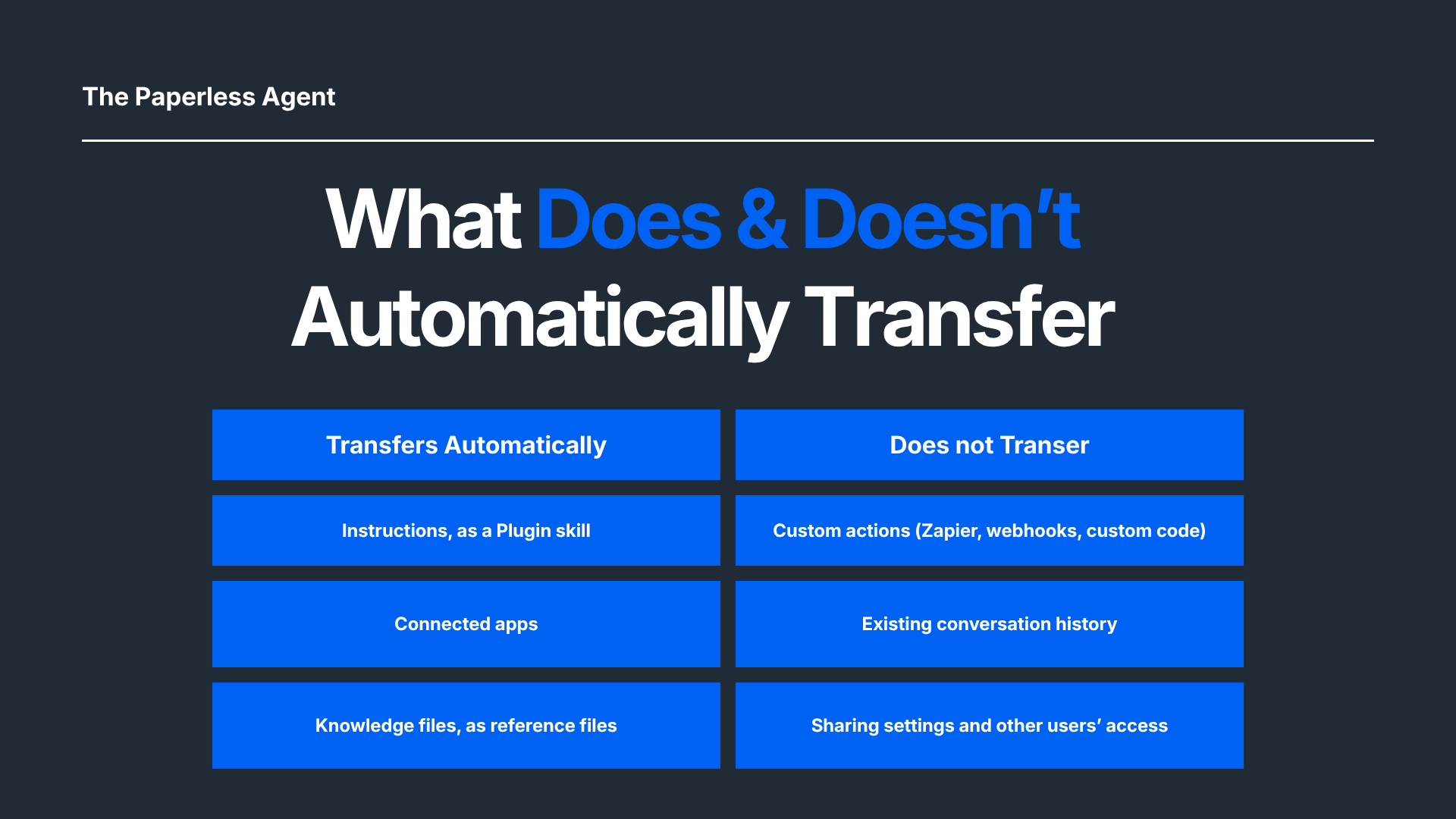
Custom actions will not migrate as part of the plugin, according to OpenAI's migration FAQ. If your GPT calls out to a CRM, a spreadsheet, or any other tool through a custom action, that connection has to be rebuilt inside ChatGPT as a plugin.
Sharing permissions do not carry over in a plugin migration either. OpenAI's migration FAQ states: "Migration doesn't carry over your GPT's sharing settings or give existing users access to replacement." Anyone using your GPT today needs a fresh invitation to the plugin once one exists.
The original GPT keeps working after you migrate it, just as a read-only reference rather than an editable GPT. OpenAI's migration FAQ states: "The original GPT remains usable until retirement, but becomes read-only after migration." Keep it open while you confirm the plugin behaves the way you expect.
A migrated plugin can also answer differently than the GPT it replaced, worth checking before you rely on it. OpenAI's migration FAQ states: "A migrated plugin may respond differently. Compare familiar prompts and check multiple aspects before relying on replacement."
How to Migrate a Custom GPT to a Plugin
Migrating a GPT you built takes six steps, start to finish.
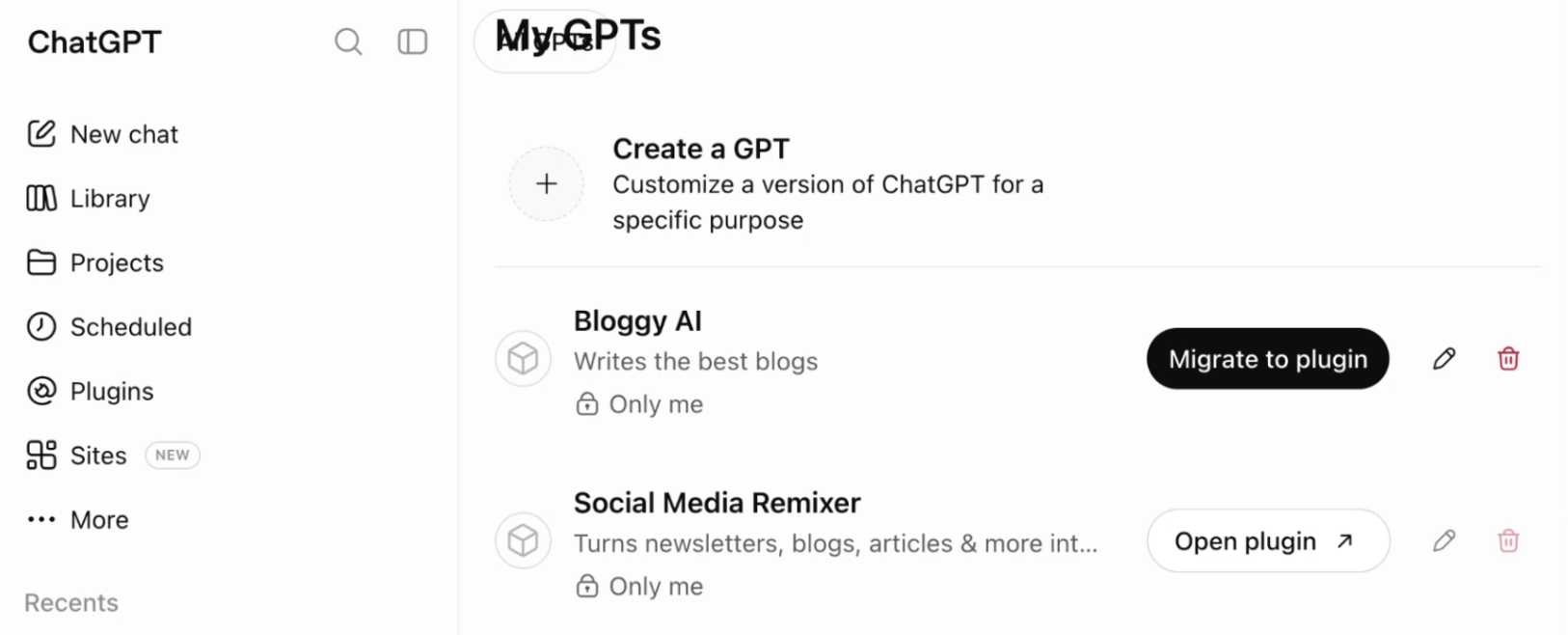
- Open My GPTs in ChatGPT.
- Select the custom GPT you want to migrate.
- Choose Migrate to Plugin.
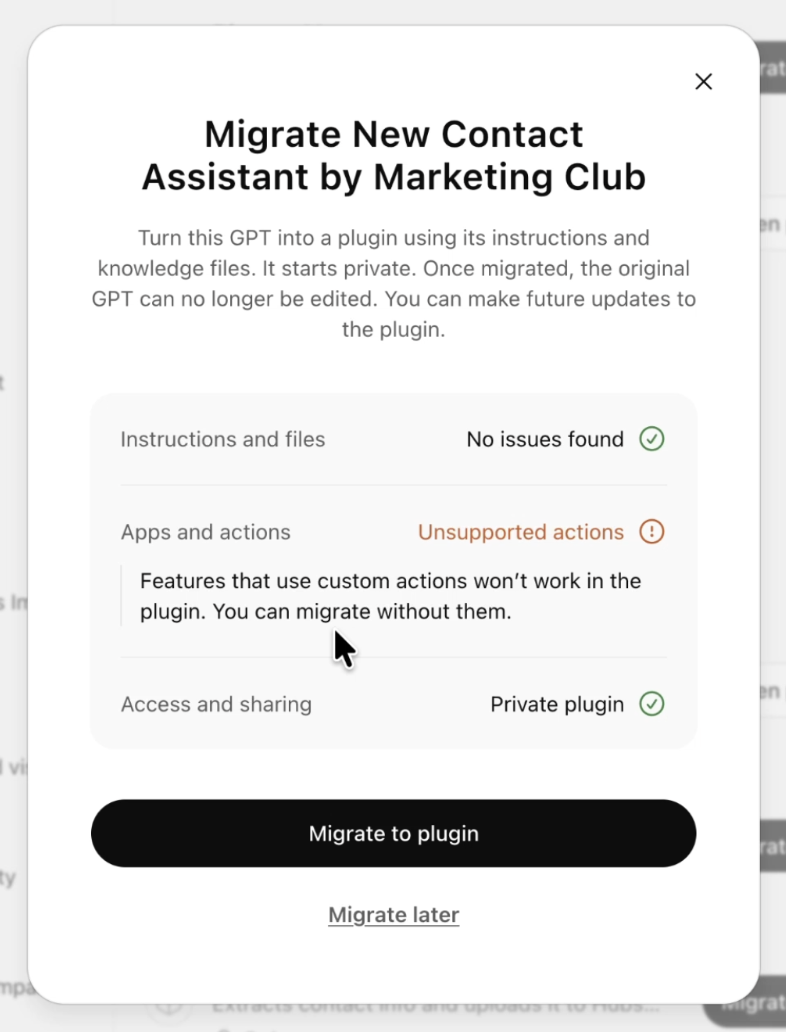
- Read the warning ChatGPT shows if the GPT uses an unsupported app or custom action, then confirm.
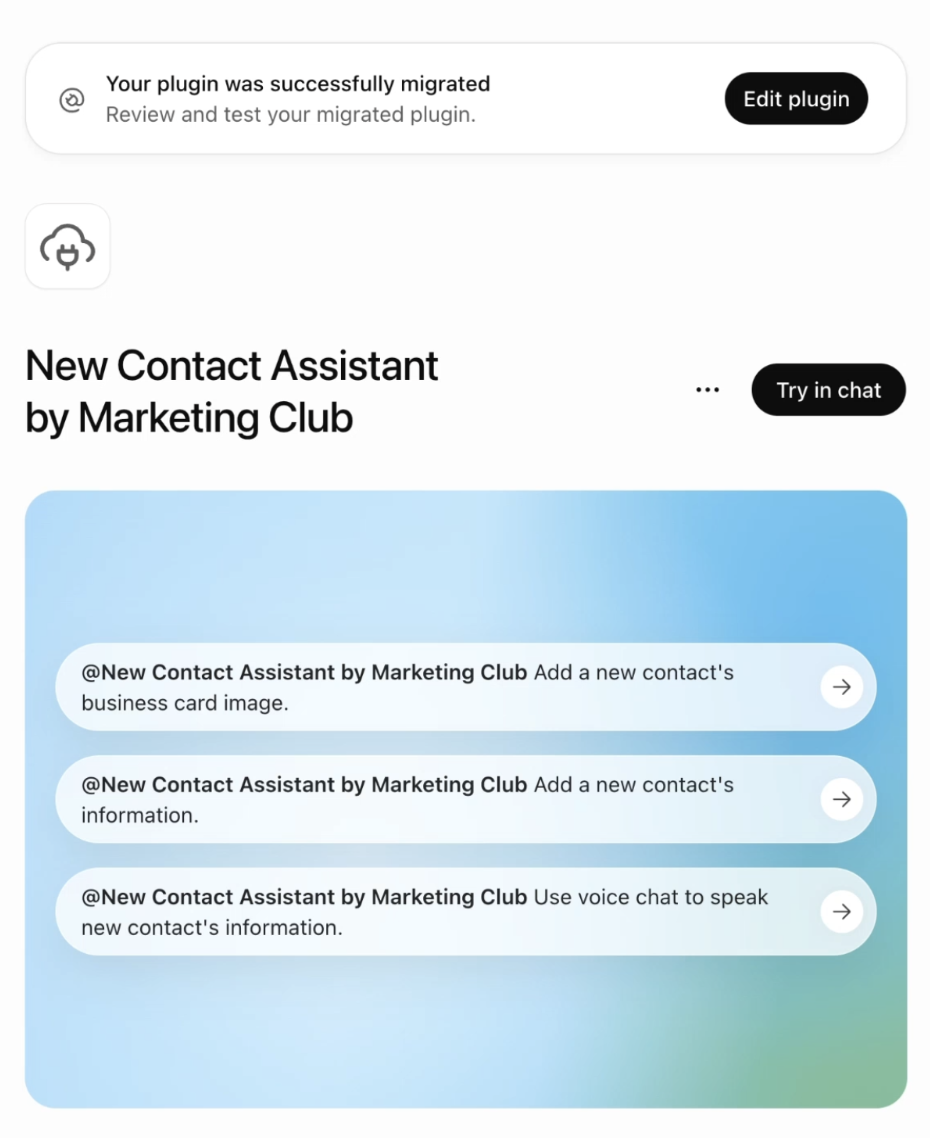
- ChatGPT converts the GPT's instructions, connected apps, and knowledge files into a new plugin.
- Open the plugin from a new chat, using the @ mention or the + menu, and test it against your own prompts.
Only the GPT's creator can run this migration. If you use a GPT someone else built, OpenAI's migration FAQ points you to the notice on that GPT and any guidance its creator has posted about a replacement.
What We Found When We Migrated a Real GPT
You do not have to guess what migrating a custom GPT looks like in practice. In September 2026, The Paperless Agent migrated one of its own GPTs, Marketing Club's New Contact Assistant, to see exactly what would carry over. The GPT's instructions cover importing and updating contact records, and it uses a Zapier custom action that connects to a CRM.
Before The Paperless Agent's September 2026 migration ran, ChatGPT displayed this warning: "Migrate New Contact Assistant by Marketing Club... Features that use custom actions won't work in the plugin. You can migrate without them." The Paperless Agent continued anyway.
In The Paperless Agent's September 2026 test, the instructions moved over completely and the plugin was usable within moments, matching what OpenAI's FAQ describes. The Zapier action did not transfer, also as OpenAI's FAQ predicts.
How we tested: The Paperless Agent tested the migration feature in September 2026, on a custom GPT from Chris's own ChatGPT Plus account.
Why the Retirement Might Be an Upgrade
Custom GPTs launched when ChatGPT itself could not connect to outside tools. A GPT was a workaround: instructions plus a narrow custom action, built to reach one app for one purpose. Regular ChatGPT now connects to CRMs and calendars directly, the same shift The Paperless Agent saw when testing its own CRM workaround against ChatGPT's native connections.
Keeping every instruction, tool, and workflow inside a single ChatGPT conversation, instead of hopping between a GPT and a separate plugin for each connected app, is the more usable version of the same idea. Migrate the GPT. Do not rebuild the workaround.
What to Do Right Now
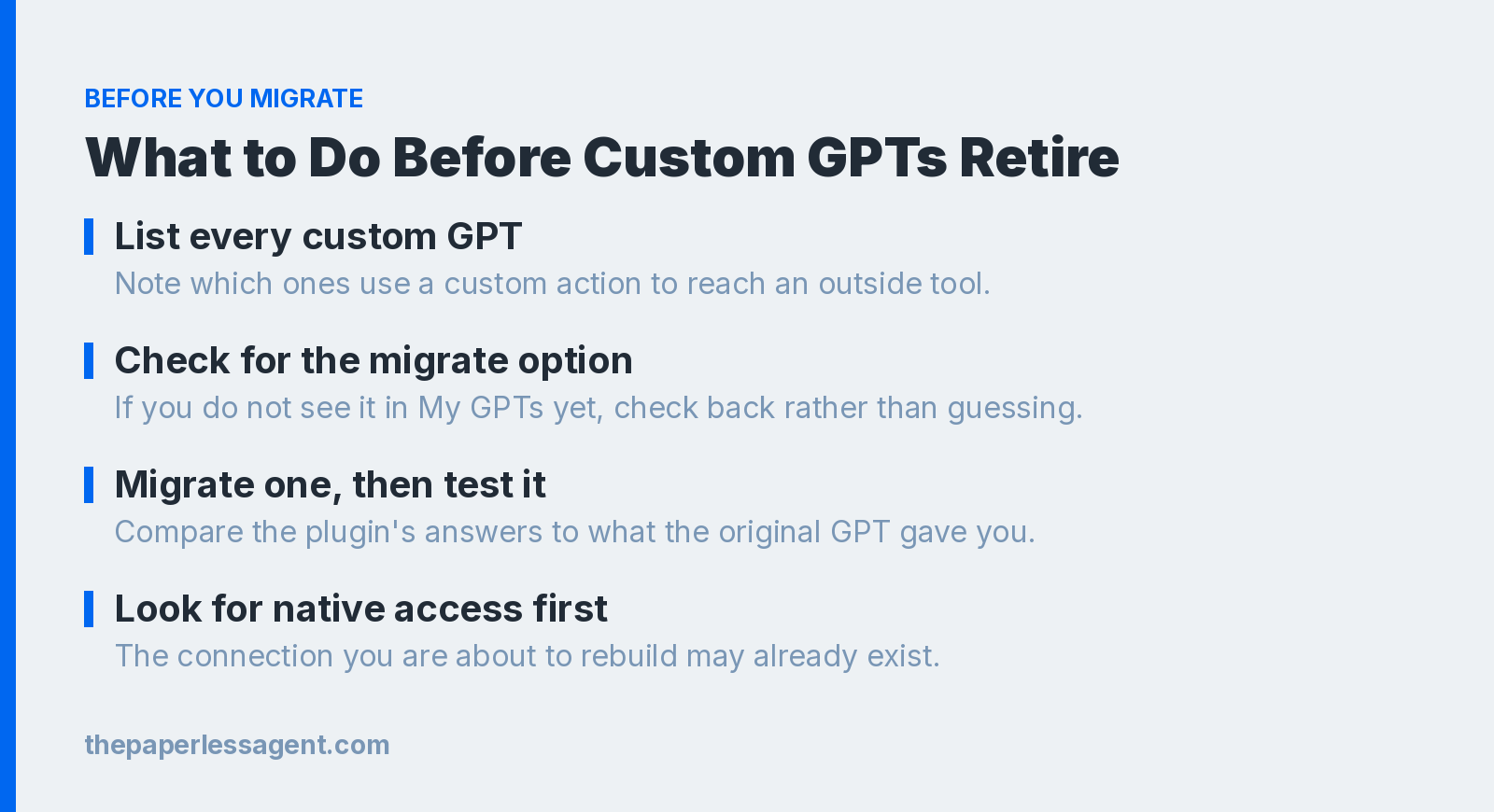
- List every custom GPT you rely on, and note which ones use a custom action to reach an outside tool.
- Separate what you built from what you use. You can only migrate a GPT you created. For anything built by someone else, check the notice on the GPT itself and any guidance its creator has posted about a replacement.
- Check My GPTs for the Migrate to Plugin option. If you do not see it yet, migration has not rolled out to your account. Check back rather than waiting for an announcement.
- Migrate one GPT and test it against your real prompts before touching the rest. Compare the plugin's answers to what the original GPT gave you.
- Before rebuilding a lost custom action, check whether ChatGPT can now reach that same app directly. The connection you are about to rebuild may already exist.
Frequently Asked Questions
Q: When do custom GPTs retire in ChatGPT? Custom GPTs are scheduled to retire on December 11, 2026, across every ChatGPT plan, free, Plus, and Team included, according to OpenAI's migration FAQ. OpenAI has not published a fixed date for when migration opens on any of these plans, so check My GPTs directly for the Migrate to Plugin option rather than waiting for an announcement.
Q: Will I lose access to my custom GPT the moment migration opens? Your custom GPT keeps working through the whole migration window. OpenAI states that existing GPTs "remain usable until the retirement date," and that after you migrate one, the original "remains usable until retirement, but becomes read-only." You can keep the source GPT open as a reference while you confirm the new plugin works the way you expect, right up until December 11, 2026.
Q: What happens to a custom action when I migrate a GPT to a plugin? A custom action does not transfer. OpenAI's FAQ says custom actions "do not transfer through the migration workflow" and that any feature depending on one "will not work until replacement setup." In a September 2026 test, The Paperless Agent migrated a GPT built on a Zapier action and confirmed this directly: the instructions came through, the Zapier connection did not. Check whether ChatGPT can now reach the same app directly before rebuilding the old workaround.
Q: Can I still use a custom GPT built by someone else? Only the creator can migrate a GPT to a plugin. If you use a GPT someone else built, check the notice banner on that GPT's page in the GPT Store and whatever the creator has posted about a replacement plugin before December 11, 2026. Having access to the original GPT does not automatically carry over to whatever replaces it, so a plugin you cannot find has likely not been shared with you yet.
Q: Do my past conversations with a GPT move to the new plugin? No. OpenAI is direct about this: "Migration doesn't move your existing GPT conversations into the plugin." Anything you want to keep from a GPT conversation, a saved output, a reference thread, needs to be copied out before December 11, 2026, since the conversation itself stays behind in the original GPT.
Q: Does a migrated plugin respond exactly like the original GPT? A migrated plugin can respond differently than the original GPT. OpenAI's own guidance is to compare the two directly: "A migrated plugin may respond differently. Compare familiar prompts and check multiple aspects before relying on replacement." Testing the same prompt in both, the way The Paperless Agent tested New Contact Assistant in September 2026, is the fastest way to catch a difference before a client sees it.
Q: Should I rebuild a lost custom action, or look for a native plugin connection first? Look for a native connection first. Custom actions were often built to reach an app that ChatGPT could not connect to directly at the time. Regular ChatGPT now connects to many CRMs and other tools without a custom action in between, the same shift The Paperless Agent tested when it retired its own CRM workaround. Rebuilding the old workaround may be solving a problem ChatGPT has since solved on its own.
Last updated: September 24, 2026.
Chris A. Scott helps professionals use AI to grow. He is an AI Marketer at The Paperless Agent and the author of Real Estate AI Professional.