

The conversation about AI agents replacing real estate agents misses something important.
The agents who understand how to build these tools are the ones using them to handle listing marketing in minutes instead of hours. They get a complete package with a property brochure, open house flyer, sphere announcement email, and social media posts all produced from a single CMA upload.
In this post I am walking through three different versions of a listing launch agent I built, each using a different ChatGPT tool. Regular ChatGPT Plus with Projects, ChatGPT Business agents, and ChatGPT's Codex tool. What I found is that there is not one clear winner. Each has meaningful pros and cons depending on your situation, budget, and how far you want to take the workflow.
What a Listing Launch Agent Does
Before getting into the three versions, it helps to understand what this agent is actually doing.
A listing launch agent takes a CMA and a folder of listing photos as inputs. From those two files, it produces a complete listing marketing package without any additional prompting:
- A property brochure with photos placed contextually throughout
- An open house flyer ready for print or digital distribution
- A listing announcement email in HTML format ready to send to your sphere
- Social media posts for Instagram and Facebook
The key distinction between a prompt and an agent: when the instructions live permanently in the tool's project or settings, you never have to type them again. Open the tool, upload the materials, hit send. The agent runs the full workflow automatically every time.
According to the NAR 2025 Technology Survey, 66% of realtors use technology to save time and 64% want to enhance the client experience. A listing launch agent addresses both of those goals simultaneously and does it in a way that produces materials you can put your name on.
Version 1: ChatGPT Plus With Projects ($20/month)
What It Is
ChatGPT Plus is the standard paid version of ChatGPT at $20 per month. The Projects feature within ChatGPT Plus allows you to save a persistent prompt in the project instructions so it runs automatically every time you open that project.
Technically this is an agent in the functional sense because it executes a multi-step workflow from a single trigger. The instructions live in the project. You upload the CMA and photos and hit send.
What the Output Looks Like
The ChatGPT Plus version produces a solid listing marketing package including a formatted brochure, an open house flyer, an HTML email ready to send to your database, and social media posts. The output is clean and covers all the core deliverables.
Connecting to Other Tools
The ChatGPT Plus version can be connected to Canva for editable design files and to Gmail for direct email drafting. These connections require a few extra steps after the agent produces its output, you manually have to push the output to each tool, but the production time is still significantly reduced compared to building each piece from scratch.
The Honest Assessment
The output requires review before it goes to clients, and there are a few manual steps involved in getting materials into Canva or Gmail. That is not a dealbreaker. When you are sending client-facing materials with your name on them, reviewing them before sending is the right practice regardless of which tool produced them.
Best for: Agents who want to get started with a listing launch agent at the lowest cost and are comfortable with a few manual steps to push output into final tools.
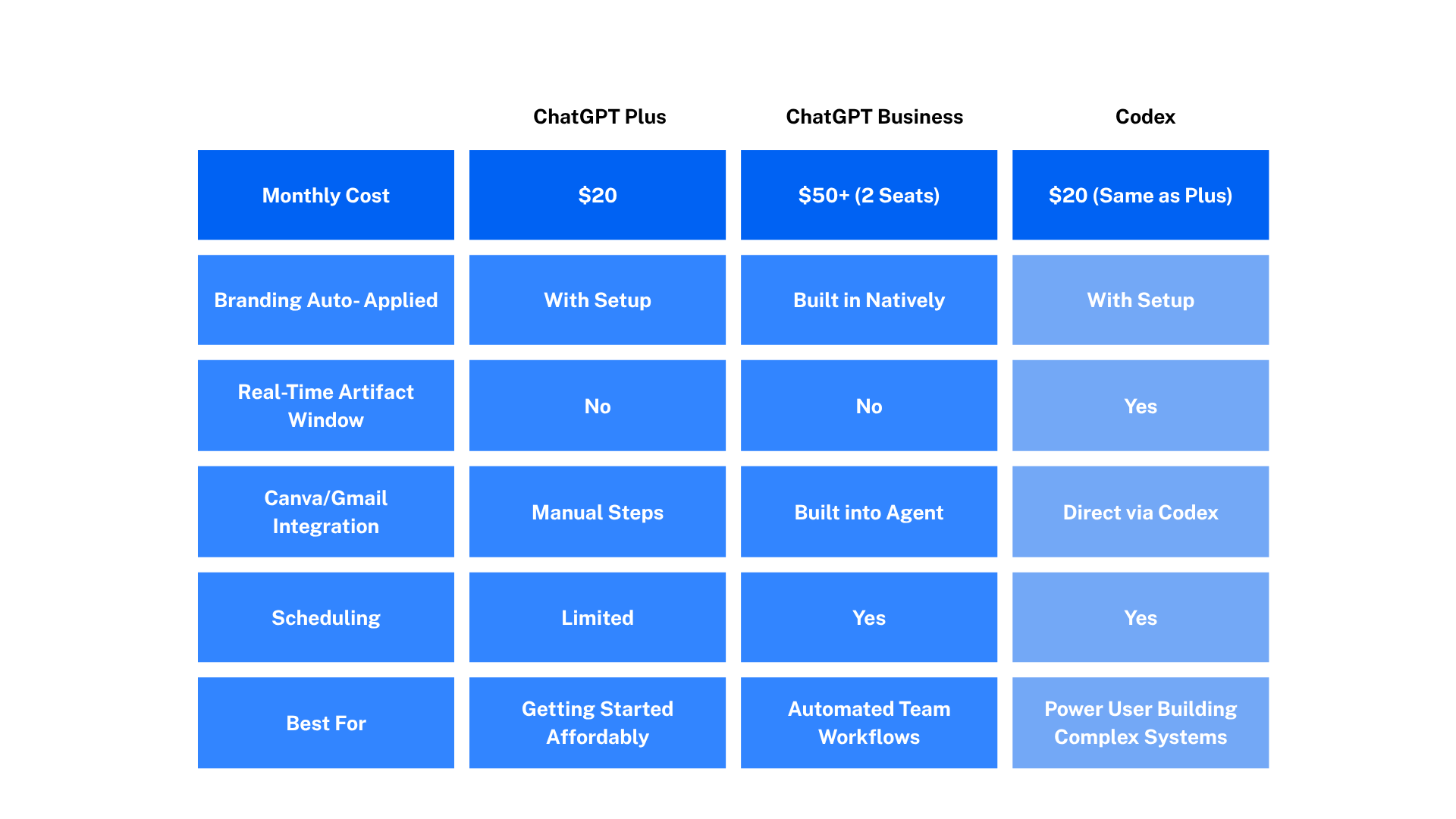
Cost: $20 per month

Version 2: ChatGPT Business Agents ($50+/month)
What It Is
ChatGPT Business has a dedicated agents feature that makes it notably easier to build repeatable, schedulable workflows. OpenAI is planning its most significant ChatGPT redesign since the platform launched, integrating AI agents, Codex coding tools, image generation, and partner applications from companies including Canva and Booking.com into a unified interface.
The Business agents feature sits closer to that vision than the Projects feature. It is designed specifically for workflow automation rather than general-purpose conversation.
What the Output Looks Like
The Business version produces a similar listing marketing package to the Plus version, but with one notable addition: branding. When setting up the agent, you can provide a headshot and brand assets that the agent pulls automatically every time it runs. The branding appears in the output without you having to add it manually or remind the tool to include it.
Key Advantages Over Plus
The Business agents feature makes it straightforward to build workflows that can run on a schedule or be triggered automatically. You can build the connection to Canva and Gmail directly into the agent so output lands in the right destination without manual transfer. The experience is more polished and more automated than the Plus version.
The Honest Assessment
The Business version is significantly more capable for building true automated workflows. The trade-off is cost. ChatGPT Business requires a minimum of two seats even if you are a solo operator, which puts the minimum monthly cost at roughly $50 — more than twice the cost of Plus.
Best for: Agents who want a more automated workflow with built-in branding and scheduled runs, and who are comfortable with the higher monthly cost.
Cost: $50+ per month (two-seat minimum)
Version 3: ChatGPT Codex
What Codex Is
Codex was originally designed for writing code, but since OpenAI launched Codex in April 2025, the way developers work with agents has fundamentally changed. In 2025, OpenAI repositioned Codex as a full agentic tool. It’s one that can receive a task, work on it autonomously, and return a finished result.
For real estate agents, the most relevant thing to understand about Codex is not the coding background. It is the artifact window and the range of tools it connects to.
You can download Codex at chatgpt.com/codex. It uses the same ChatGPT login as your existing account, and anyone with a ChatGPT Plus, Pro, Business, Enterprise or Edu subscription can use Codex across the CLI, web, IDE-extension and app with their ChatGPT login
What the Output Looks Like
The Codex version produces the same core listing marketing package with a brochure, open house flyer, email, and social posts. The notable difference is in how the output is presented. Codex has an artifact window that shows you the materials as they are being built and updates in real time as you request changes.
When you ask Codex to convert the brochure to a PDF and upload it to Canva, it does that directly. When it gets to Canva, minor text formatting issues may appear, but that is exactly what Canva is for. Quick edits in Canva before printing or sharing is a normal part of the workflow.
What Makes Codex Different
Two things stand out about Codex compared to the other two versions:
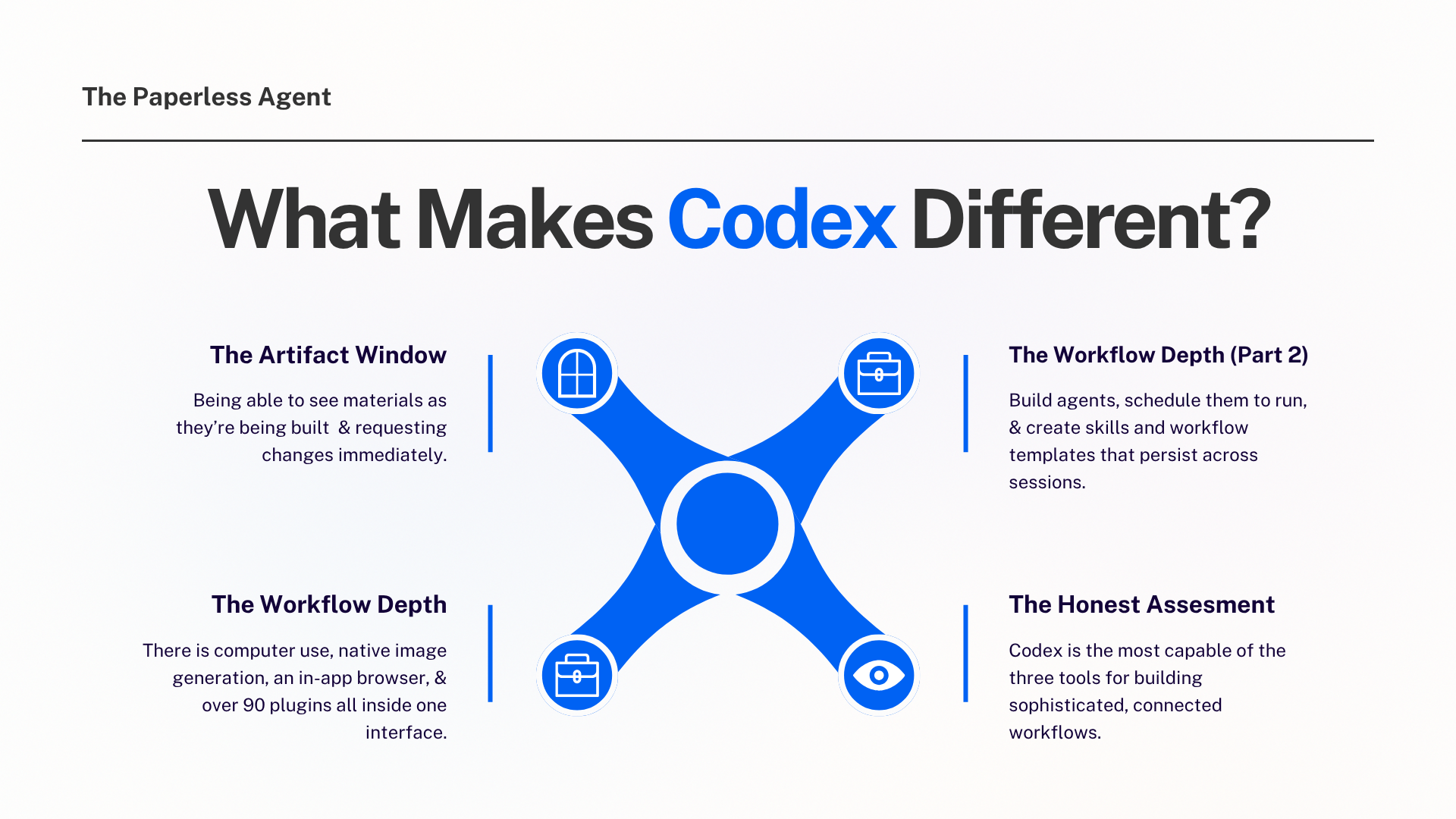
The artifact window. Seeing your materials rendered in real time as they are built gives you a clearer sense of what the output looks like before you finalize it. Requesting changes is immediate, you see the update happen rather than waiting for a new response.
The workflow depth. In early 2026, OpenAI has been systematically expanding Codex from an AI coding tool into something closer to a full development platform. There is computer use, native image generation, an in-app browser, and more than 90 plugins all inside one interface. You can build agents, schedule them to run on daily, weekly, or hourly timeframes, and create skills and workflow templates that persist across sessions.
OpenAI is working on a desktop super app that would combine ChatGPT, its Codex coding agent and Atlas web browser into one cohesive experience, making Codex the most forward-looking of the three options for agents who want to build increasingly sophisticated workflows over time.
The Honest Assessment
Codex is the most capable of the three tools for building sophisticated, connected workflows. It offers more customization, more connection options, and a better working experience for iterating on output in real time.
Best for: Agents who want the most capable tool, are comfortable spending some time learning the interface, and plan to build more advanced workflows over time.
Cost: Included with ChatGPT Plus ($20/month) with no additional seat required unlike Business
Three Principles for Building Listing Agents (Any Tool)
After building this agent in three different environments, a few consistent principles emerged. These apply regardless of which tool you use.
1. Start With a Functioning Prompt
Do not try to build a sophisticated agent from scratch. Start with a basic prompt that does roughly what you want (Ex: produces a listing description, or drafts an email), and build from there. Getting the foundation working first makes everything else easier to layer on.
2. Plan Your Connectors Before You Build
Connections to third-party tools like Canva and Gmail need to be established in your account settings before you can use them inside an agent. The connector has to be authenticated before the agent can call it. Check your settings, authorize the connections you plan to use, and then build the agent around them.
3. Plan for Debugging Time
When the agent kind of works but misses the mark on something specific, that gap requires iterative prompting to close. Give it a revised instruction. See what changes. Revise again. The iterative process (prompt, review, refine, repeat) is how you get from an agent that mostly works to one that produces output you are comfortable sending to clients every time.
This is true for every agent in every tool. The debugging phase is where the real work of building a reliable workflow happens.
The One Thing That Does Not Change Across Any Version
Regardless of which tool you use, the listing marketing package it produces needs your review before it goes to a client.
Check the property details against your CMA. Read the copy with your client in mind. Is it accurate? Is it compliant with your market's rules and Fair Housing requirements? Does it sound like you?
In March 2026, Ryan Serhant reported a $50M deal nearly collapsed after both buyer and seller consulted ChatGPT at the last moment. Both were advised to walk away. ChatGPT had no context about deal terms, relationship history, or concessions already made
That example is about client-facing AI use without professional judgment applied. The same principle holds for listing marketing: AI produces the first draft at a professional quality level, and you apply the judgment that comes from knowing your client, your market, and your professional obligations.
The goal is a faster review, not no review.
Which Version Is Right for You?
If you are just getting started with a listing launch agent, ChatGPT Plus with Projects is the most accessible entry point at the lowest cost.
If you want built-in branding, scheduled runs, and a more automated workflow, ChatGPT Business is worth the additional cost.
If you want the most capable tool with the best long-term ceiling for building sophisticated workflows, Codex at the same $20 price point as Plus is the strongest option.
Frequently Asked Questions
Q: Do I need to know how to code to use Codex for a listing marketing agent? No. Despite its origins as a coding tool, Codex is designed to accept plain language instructions for any kind of task. You interact with it the same way you would with ChatGPT, by describing what you want in natural language. The coding background just means it handles complex, multi-step instructions particularly well.
Q: What is the difference between a ChatGPT Project and a ChatGPT agent? A Project is a persistent workspace within ChatGPT where you save instructions and context that carry across multiple sessions. When those instructions are comprehensive enough to execute a full multi-step workflow from a single trigger, it functions as an agent in practice. A formal ChatGPT Business agent is a more structured version with additional features like native branding application and easier scheduling. The underlying logic is similar and the difference is in the polish and additional capabilities.
Q: Can I connect both Canva and Gmail to my listing launch agent? Yes, but the connections need to be established in your account settings before you build them into the agent workflow. For ChatGPT, look for the connected apps or integrations section in your settings. Authenticate each connection there, and then reference it in your agent instructions.
Q: Does the agent produce legally compliant listing copy automatically? The agent produces copy based on the instructions you give it and the CMA data you upload. It does not independently verify Fair Housing compliance or MLS-specific rules. You need to review all output against your market's rules and Fair Housing requirements before sending. This is one of the key reasons the review step is non-negotiable.
Q: How long does it take the agent to produce the full listing marketing package? Processing time varies by tool and by the complexity of the CMA and number of photos. Typical runs produce the full package in two to five minutes. Review time varies by agent but shortens significantly as you refine the instructions over time.
Q: Is Codex included in my existing ChatGPT Plus subscription? Yes. You access Codex at chatgpt.com/codex using your existing ChatGPT login. ChatGPT Plus, Pro, Business, Enterprise, and Edu subscribers all have Codex access included. You do not need to pay for a second seat the way you would with ChatGPT Business.
Q: Can the agent get smarter over time as I give it feedback? Yes, and this is one of the most valuable features of building workflows in Projects or Codex. Both retain notes and preferences from session to session. When you request a change, that refinement is remembered. The tenth listing requires less review time than the first because the agent has incorporated your preferences over time.
Q: Where can I get the prompt used to build this agent? The prompt structure is covered in the video linked above. The full prompt is also available in the Marketing Club Prompt Library for members.
📎 Resources mentioned in this post:
- ChatGPT Codex: https://chatgpt.com/codex
- ChatGPT Plus: https://chat.openai.com
- Canva: https://www.canva.com
Chris A. Scott is a Real Estate Digital Marketer & AI Strategist at The Paperless Agent where we make AI and real estate technology useful, practical, and profitable.